Tripp Lite 4 Port USB Switch, USB 3.0 Peripheral Switch, SuperSpeed 5 Gbps, Black
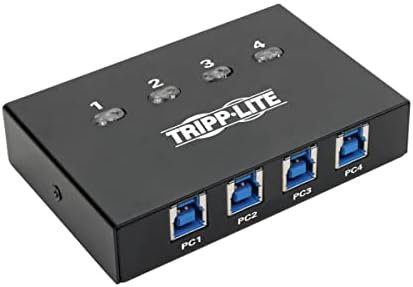
Desks get crowded when separate machines need the same hardware. We built this switch to let multiple computers access a single peripheral without swapping cables by hand. A top-mounted push button toggles the active connection immediately.
Price as the listing last showed it. Listings move, so the figure on the page you land on is the one that counts at checkout.
- Usb sharing switch: This compact 4-Port USB peripheral-sharing switch lets you share one USB 3. 0 peripheral between two computers. By sharing a USB 3. 0 Printer or webcam between four computers, you save time, money and precious workspace. Maximum distance from host device to peripheral is 16 feet.
- Supports 5 Gaps SuperSpeed USB 3. 0: This peripheral switch supports USB 3. 0 data transfer rates up to 5 Gaps, which is 10 times faster than USB 2. 0. It is especially recommended for high-bandwidth USB 3. 0 devices.
- Easy one-touch control: switch between computers quickly with the button on top of the unit- great as a printer switch. Blue LEDs indicate which computer is currently in control of the connected USB 3. 0 peripheral.
- Backwards compatible: The 4 port USB switch is backward compatible with previous USB generations, so you can continue using older peripherals while getting maximum performance from current devices.
- Plug-and-play operation: The USB sharing switch Requires no external power supply or software and drivers to download and install. The USB 3. 0 Sharing switch supports all USB-enabled operating systems.
How this one is built
Top push button
Switching between connected computers takes a single press on top of the small housing. Blue indicator lights show which machine has active access to the shared gear right away, cutting down on guess work.
SuperSpeed throughput
High-bandwidth gear like modern cameras, storage drives, and printers move data across the line at SuperSpeed rates. The switch also supports connections to older USB generations without requiring special adapters.
No external power
The unit draws whatever current it needs directly from the connected USB bus lines. You plug in your computer cables and start working without adding another power supply behind the desk.
Chicago technical help
Support staff in our Chicago office assist with connection questions or system setups when needed. You speak with technicians who work with these switches on their own benches.
On the nameplate
These are the figures published for this unit. Where a number is missing here it was not printed on the listing, and we would rather leave the row out than fill it with a guess.
| Material | Copper |
|---|---|
| Color | Black |
| Warranty | 3-year limited warranty |
Others from USB hubs and docks
Sorted by how many people have rated them.