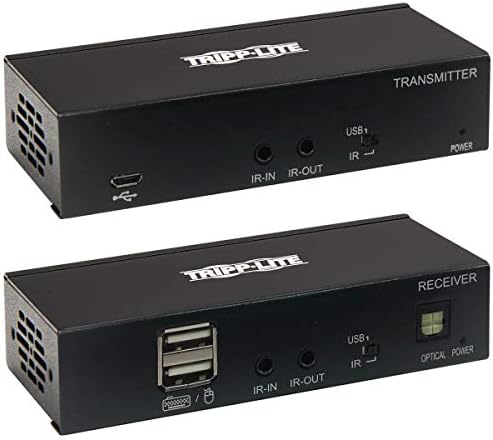
Tripp Lite DisplayPort to HDMI Over Cat6 Extender Kit w KVM Support 4K@60Hz (B127A-1A1-BDBH)
When a presentation display sits across a hall or up on a wall bracket, standard video cords come up short. We built this kit to bridge that distance over ordinary network patch cabling. It couples a DisplayPort source to an HDMI screen while carrying power across the line.
Price as the listing last showed it. Listings move, so the figure on the page you land on is the one that counts at checkout.
- DISPLAYPORT TO HDMI EXTENDER KIT IDEAL FOR DIGITAL SIGNAGE IN SCHOOLS AND LECTURE HALLS: This complete transmitter and receiver system is recommended for video presentations in conference rooms, schools, trade shows, meeting facilities, houses of worship, retail settings, hotels and other digital signage applications where the source and display are farther apart than conventional A/V cables allow.
- EXTENDS A 4K A/V TRANSMISSION UP TO 230 FT: The B127A-1A1-BDBH extends 4K signals from a DisplayPort source device to an HDMI display up to 230 feet away via user-supplied Cat6 cabling. By adding a Tripp Lite B127A-010-H HDMI repeater or B127A-110-BH transceiver (sold separately) to the application, you can extend the signal up to 400 or 460 feet, respectively.
- BUILT-IN POC TECHNOLOGY LETS YOU AVOID BULKY EXTERNAL POWER BRICKS: After you connect the included external power supply to either the transmitter or receiver, Power over Cable (PoC) technology powers the opposite unit over Cat6 cable. LEDs on both the transmitter and receiver will light up to indicate the system is receiving power and a signal is being transmitted. PoC lets you avoid the hassle of a bulky power brick and gives you the freedom to place one unit where needed without worrying about finding a nearby AC outlet.
- PLUG AND PLAY OPERATION FOR QUICK SETUP AND IMMEDIATE USE: The included transmitter and receiver units work right out of the box with no software required. Mounting hardware is included for installing both units on a wall, pole or 19-inch rack. Connect the transmitter to the source with a user-supplied DisplayPort cable (such as Tripp Lite’s P580-Series). Then connect the receiver to the display with a user-supplied HDMI cable (such as Tripp Lite’s P568- or P569-Series). Finally, connect the two units with user-supplied Cat6 patch cable (such as Tripp Lite N202-Series).
How this one is built
Single-cable power delivery
Power over Cable technology feeds electricity to both the transmitter and receiver using only one plugged-in adapter. You can mount the remote unit behind a ceiling screen or inside a kiosk without hunting down an extra wall socket.
High-resolution video pass
The hardware carries sharp Ultra HD video along with uncompressed multichannel digital sound and high dynamic range. Built-in equalization controls let you dial in image clarity at the remote screen so text and graphics remain crisp.
Hardware mounting hardware
Included brackets let you secure both metal housings to a wall, anchor them to a pole, or mount them onto a rack rail. They stay put behind conference room monitors and lecterns instead of hanging from the video jacks.
Status indicator lights
Built-in light-emitting diodes on both enclosures confirm when units receive line power and when a live signal passes across the link. A quick glance tells you if the connection is active before you start troubleshooting.
On the nameplate
These are the figures published for this unit. Where a number is missing here it was not printed on the listing, and we would rather leave the row out than fill it with a guess.
| Connector | Rj45, Displayport, Hdmi |
|---|---|
| Color | Black |
| Weight | 1.9 pounds |
| Warranty | 1-year limited warranty |
Others from ethernet cables
Sorted by how many people have rated them.