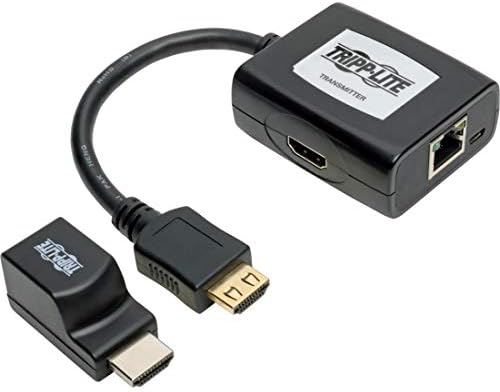
Tripp Lite HDMI Extender Kit Video Converter (B126-1P1M-U-POC)
When a display sits far from your media source, standard patch leads fall short. This kit pairs a compact transmitter with a receiver to push clean picture and sound down a network drop. The remote box pulls power directly through the run, so you avoid hunting for an outlet behind a wall-mounted screen.
Price as the listing last showed it. Listings move, so the figure on the page you land on is the one that counts at checkout.
- EXTENDER KIT: Transmitter and receiver extend an HDMI signal via Cat5e/6/6a cable to a projector, monitor or TV up to 100 ft. away. Recommended for digital signs, classrooms, churches, offices and retail settings.
- Extends HDMI over Cat5/6: the extender kit can extend a high-definition 1080p (at 60 Hz) signal up to 50 feet and a 1080i signal up to 100 feet. Supports high-definition video resolutions up to 1080p (@ 60 Hz). Supports 7. 1-Channel surround sound audio. Hdpe and 3D Compliant.
- POWER OVER CABLE: HDMI over Cat5/Cat6 Extender Kit includes a transmitter and a low-profile receiver that work in tandem to extend an HDMI audio/video signal to a projector, monitor or television. Built-in Pock technology powers the receiver over Cat5e/6/6a cable, so no external power supply on the display side is needed.
- Tea-compliant & easy to use: Compliant with the Federal Trade Agreements Act (tea) for GSA Schedule purchases. Hdmi over Cat5/Cat6 extender kit is plug-and-play operation with no software or drivers required.
- compatible devices: TV Monitor Projector
How this one is built
Single cable run
Network cabling replaces thick patch leads over long reaches through drop ceilings or conduit. High-definition picture and multichannel audio carry together over that single run to keep the installation tidy.
Power over cable
The remote unit draws operating power over the network run from the transmitter. That leaves the display end uncluttered, which helps when mounting a screen on a high wall or ceiling plate without nearby power.
Low-profile receiver
The small receiver tucks out of view behind a television, monitor, or ceiling projector. Its compact footprint fits into tight spaces behind flat panels where bulky converter hardware will not fit.
Clean setup
Connecting your source and screen requires no extra software or driver configuration. You plug in your leads, link the two units across the network run, and the hardware handles the signal conversion.
On the nameplate
These are the figures published for this unit. Where a number is missing here it was not printed on the listing, and we would rather leave the row out than fill it with a guess.
| Color | Black |
|---|
Others from video and A/V
Sorted by how many people have rated them.