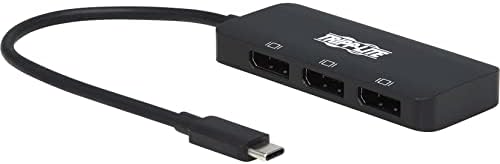
Tripp Lite USB-C Three-Monitor DisplayPort Adapter, Windows & MacBook Pro
Setting up multiple screens on a crowded bench should not require an extra power brick. This adapter connects to your laptop port and feeds up to three DisplayPort monitors at once. You get clean video across your displays while keeping the desk tidy.
Price as the listing last showed it. Listings move, so the figure on the page you land on is the one that counts at checkout.
- USB-C TO DISPLAYPORT 4K ADAPTER: Connects 3 DisplayPort 4K monitors to the USB-C or Thunderbolt port on your MacBook Pro or Windows laptop. Converts audio/video signals from sources supporting USB-C DisplayPort Alt Mode.
- CRYSTAL-CLEAR 8K/4K VIDEO: Plays 8K video on one connected display for brilliant video. Displays 4K video on 3 monitors simultaneously for multitasking and increasing productivity.
- DISPLAYPORT SST AND MST MODE COMPATIBLE: DisplayPort Single-Stream Transport (SST) or Multi-Stream Transport (MST) can display the same image on both monitors, extend your host desktop, or combine both into one large display as a video wall.
- NO ADDITIONAL SOFTWARE NEEDED: Plug-and-play operation with no software required for easy, immediate installation or external power.
- RELIABLE PRODUCT FULLY BACKED AND SUPPORTED: This product is covered by a Manufacturer's 3-Year Limited Warranty and is supported by Tripp Lite's Chicago-based expert technical support team over phone and email.
How this one is built
Multi monitor routing
Send your desktop across several screens or mirror the same image to all of them. It handles both single-stream and multi-stream transport modes so you can arrange your workspace however the job requires.
Source port compatibility
The attached lead plugs right into a laptop running Windows or macOS. As long as the host port supports alternate mode, video and audio pass through without extra hardware between them.
Direct bus power
The unit pulls what it needs straight from the source computer. You do not have to find an open receptacle on the power strip or run another wall adapter behind the desk.
Driver free installation
Connect the displays and plug the cable in. Operating systems recognize the adapter immediately, so you can reconfigure a workstation without downloading setup files or waiting for background utilities to install.
On the nameplate
These are the figures published for this unit. Where a number is missing here it was not printed on the listing, and we would rather leave the row out than fill it with a guess.
| Watts | 10 W |
|---|---|
| Color | Black |
| Weight | 1.6 ounces |
| Warranty | 3-year limited warranty |
Others from video and A/V
Sorted by how many people have rated them.