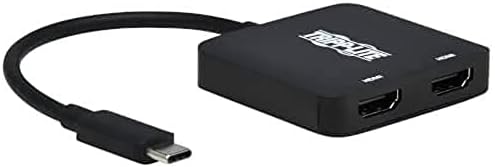
Tripp Lite USB-C Two-Monitor HDMI Adapter, Windows & MacBook Pro, 4K @ 60Hz 4:4:4 Dual Output
Setting up a dual-display workstation usually means dealing with bulky hubs or scarce video ports. We built this adapter to pull audio and video straight from a USB-C or Thunderbolt connection out to two HDMI screens. It fits in a laptop bag and sets up without extra power bricks.
Price as the listing last showed it. Listings move, so the figure on the page you land on is the one that counts at checkout.
- USB-C TO HDMI 4K ADAPTER: Connects dual HDMI 4K displays to the USB-C or Thunderbolt 3 port on your MacBook Pro or Windows laptop. Converts audio/video signals from sources supporting USB-C DisplayPort Alt Mode.
- CRYSTAL-CLEAR 4K VIDEO: Plays 4K video on 2 displays simultaneously for multitasking and increasing productivity. Supports UHD resolutions up to 4K @ 60 Hz (4:4:4) with 7.1-channel surround sound.
- DISPLAYPORT SST AND MST MODE COMPATIBLE: DisplayPort Single-Stream Transport (SST) or Multi-Stream Transport (MST) can display the same image on both monitors, extend your host desktop, or combine both into one large display as a video wall.
- NO ADDITIONAL SOFTWARE NEEDED: Plug-and-play operation with no software required for easy, immediate installation or external power.
- RELIABLE PRODUCT FULLY BACKED AND SUPPORTED: This product is covered by a Manufacturer's 3-Year Limited Warranty and is supported by Tripp Lite's Chicago-based expert technical support team over phone and email.
How this one is built
Source connection
The built-in USB-C pigtail plugs directly into your Windows laptop or MacBook Pro. It draws power right from the bus and taps DisplayPort Alt Mode to carry both video streams over a single connection.
Dual monitor output
Two HDMI ports feed external screens side by side on your desk. You can mirror your main workspace across both panels, stretch a wide desktop across the pair, or run them in single-stream mode depending on your operating system.
Audio and video fidelity
Ultra high-definition video passes cleanly to each screen along with multichannel surround sound. Images stay crisp across both panels without introducing signal noise or tearing across extended work areas.
Plug and play setup
There are no software drivers to install and no external power cords to route beneath the desk. Plug the lead into the host computer, attach standard HDMI cabling to your displays, and the system recognizes the hardware immediately.
On the nameplate
These are the figures published for this unit. Where a number is missing here it was not printed on the listing, and we would rather leave the row out than fill it with a guess.
| Connector | HDMI, USB Type C |
|---|---|
| Color | Black |
| Weight | 1.92 ounces |
| Warranty | 3-year limited warranty |
Others from video and A/V
Sorted by how many people have rated them.